Legal Text Collector
- 4.0
- Rating
- 100.00K
- Installs
- Free
- Price
 Analysis by App-foxy
When an important conversation is buried inside a messaging app, saving it can be surprisingly awkward. Screenshots may split a long exchange across dozens of images, copying text can lose the original order, and forwarding the conversation to someone else is not always appropriate. Legal Text Collector is a communication app built around a much narrower task: turning messages into a PDF that can be kept, shared, or reviewed later. I found that focus useful when the conversation itself mattered more than the chat app where it originally happened.
The app is free to use, is suitable for Everyone, and comes from the developer Legal Text Collector. Its average rating is 4.0 from around 500 ratings, while its reach has passed 100K installs. Those figures suggest a practical audience rather than a novelty experiment. The current version is 2.24.2, and it supports Android from version 4.4 onward, which also makes it relevant to people using older phones.
From a message that matters to a usable PDF
I’ll focus this section on the point where a useful message becomes a document someone else can actually read. In my view, the key choice is not simply whether to export, but how much surrounding conversation to keep so the PDF stays clear without exposing unrelated details.
You May Also Like

 Blood Strike: 2.5 Anniversary
Blood Strike’s Loadouts Turn Every Drop Into a Tactical Gamble
A close look at Blood Strike’s custom loadouts: how fast access to signature weapons reshapes its battle royale rhythm, rewards preparation, and narrows the gap between fights.

 Pandora - Music & Podcasts
Pandora’s Music Is Easy to Start, but Harder to Recover
Pandora’s strength is its low-effort path from a seed to a station. Its weak spot is how much confidence it asks you to place in connection, setup, and quiet recovery.

 8 Ball Pool
 Is Built on Rivalries, Rematches, and Routine
A close look at the rivalries, rematches, shared routines, and unanswered safety questions that turn a quick pool match into a persistent mobile community.

 Samsung Music
’s Quiet Strength Is Playing What You Already Own
Its reach comes less from spectacle than from dependable access to a personal library. That simplicity is both the app’s strongest retention engine and its ceiling.

 AccuWeather: Weather Radar
AccuWeather Review: A Quick, Clear Forecast for Everyday Decisions
For everyday plans, the best forecast is the one you can understand quickly. AccuWeather makes rain timing, radar, and local conditions easy to act on, with a few trade-offs.

 Hill Climb Racing
Why Hill Climb Racing Still Turns Crashes Into One More Run
A tiny car, a bumpy hill and one more upgrade: Hill Climb Racing keeps resurfacing because its simple chaos makes every near-miss feel personal.
More From Our News Desk



The starting condition: preserving a conversation before it disappears
The best way to understand this app is to begin with the problem it solves. Imagine that a delivery company sends you a series of messages about a damaged parcel, or that a landlord confirms a repair arrangement in a chat. You may need to keep the wording, dates, and sequence together. A screenshot can be useful as a quick visual record, but it is difficult to search, annotate, or pass cleanly to another person. A copied text block is easier to edit, but that can make the original context less clear.
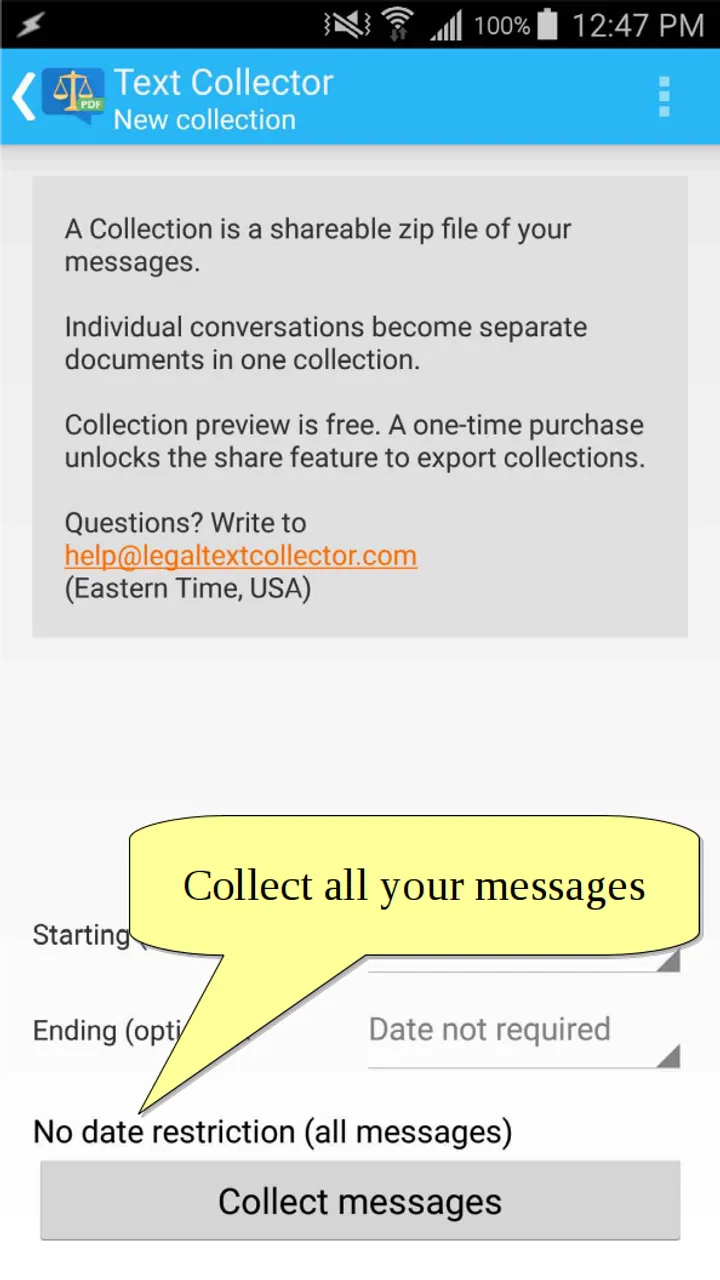
Legal Text Collector gives that situation a dedicated destination. Rather than treating a message as something that should remain trapped in a conversation thread, it treats the text as material to collect and export. That distinction is important. I would not install it merely to save occasional jokes or casual notes; the extra step is worthwhile when a conversation has practical, administrative, or evidential value.
The name may make the app sound limited to formal disputes, but the workflow can also suit everyday records. I can see it helping with appointment instructions, school communication, service complaints, project decisions, or a sequence of messages that needs to be handed to a colleague. The common thread is that the message should become a stable document instead of remaining dependent on a particular chat screen.
Step one: decide what deserves to be collected
Before opening the app, I would first identify the exact part of the conversation that needs preserving. This is more important than it sounds. Saving an entire thread can create a bulky document filled with greetings and unrelated replies, while saving too little may remove the context that gives a message meaning. A focused selection is usually easier for another person to understand.
For a real complaint, I would keep the first description of the problem, the company’s response, any promised action, and the final outcome. For a work handoff, I would preserve the decision, the person responsible, and the deadline mentioned in the exchange. This small preparation step improves the final PDF more than simply exporting everything at once.
There is also a privacy reason to be selective. A conversation may contain phone numbers, addresses, private comments, or unrelated messages. Collecting only the relevant material reduces the chance of sharing something that the recipient never needed to see. The app can help create a document, but it cannot decide which parts of a conversation are appropriate to disclose.
Step two: move the message into the collection workflow
The central task is getting the text from the messaging environment into the app’s document workflow. In practice, the smoothness of this handoff depends on how the original messaging application exposes its text and sharing options. If the message can be selected or shared as text, the process is more natural. If the conversation only offers images or an unusual export format, the experience becomes less direct.
That is one of the first trade-offs to understand. Legal Text Collector is designed for saving messages as PDF, not for acting as a universal archive of every type of chat content. I would expect the strongest results when the source is actual message text. Images, stickers, voice notes, attachments, and elaborate formatting should not be treated as though they will automatically become a polished text document. If those elements are the heart of the conversation, a different archiving method may be more suitable.
My practical advice is to test the workflow with a harmless conversation before relying on it for something important. Use a short exchange, send it through the collection process, and inspect the resulting document. This confirms whether the source app passes along the content in the way you expect and gives you a chance to spot missing context before a deadline.
Step three: check the sequence before sharing
A PDF is more useful when a reader can follow it without asking what happened first. After collecting the text, I would review the order, names, timestamps, and line breaks. Even when the wording is preserved, a poor sequence can make a calm exchange look confusing. This is especially relevant when messages were sent over several replies or when two people responded close together.
This review is also where I would remove unnecessary material. A document intended for a customer-service escalation should open with the relevant issue, not with weeks of unrelated conversation. A document for a family member may need more background. The right amount of context depends on the person receiving the file, so the app’s value is greatest when the user takes responsibility for editing the scope before export.
One useful workflow is to create separate PDFs for separate issues instead of one giant record. For example, a repair discussion and a billing discussion may involve the same contact but require different recipients. Smaller files are easier to name, store, and resend. This is a simple organizational advantage that is easy to miss when the immediate goal is only “save the chat.”
Step four: produce the PDF and give it a clear identity
The outcome is a PDF, which is a sensible format for handoffs because it is familiar and generally easier to view across devices than a proprietary chat export. I like the idea of using a descriptive filename that includes the subject and date in plain language, such as “parcel-damage-conversation” or “repair-confirmation.” A clear name matters when several records accumulate in a downloads folder or cloud drive.
The PDF should be treated as a finished copy, not as a replacement for the original conversation. I would keep the original messages available until I had checked the document and confirmed that the recipient received it. This two-stage approach protects against a common mistake: deleting the source too early and discovering later that an attachment, timestamp, or important reply did not make it into the saved version.
For formal matters, I would also record when the PDF was created and where the original conversation remains. That does not turn the file into a legal ruling or guarantee that every organization will accept it as proof. It simply creates a clearer chain for your own records. The app helps with preservation; the surrounding documentation still depends on the user.
The handoff: sending the result to the right person
Once the document exists, the next stage is usually more important than the export itself. A PDF may be sent to a customer-service team, a manager, a family member, or a professional adviser. Each recipient needs a different amount of explanation. I would include a short note identifying what the document covers and what action I want from the recipient.
For instance, sending only a file named “messages.pdf” forces the reader to open it without context. A note such as “This contains the exchange about the damaged parcel and the promised replacement; please review the final two replies” makes the handoff faster. The app creates the record, but a useful handoff requires a human summary.
This is also where PDF becomes preferable to a sequence of screenshots. Screenshots may be visually persuasive, but they are cumbersome to scroll through and harder to organize. A single document gives the recipient one item to open and retain. On the other hand, screenshots can preserve the exact appearance of a chat interface, so I would choose them instead when layout, profile identity, or visible app context is itself central to the issue.
What the finished document does well
In my experience, the app’s clearest strength is its narrowness. It does not try to become a full messaging client, a general note-taking system, or a cloud collaboration platform. Its purpose is to move message content toward a portable document. That makes the workflow easier to explain to someone who only needs a record and does not want to learn a large archive system.
The PDF result is particularly practical for records that will be read by someone outside the original conversation. A colleague does not need access to your private chat, and a service team does not need to join a personal messaging thread. The document creates a boundary between the original exchange and the person who needs to inspect it.
Another strength is its usefulness on older Android hardware. Because the minimum operating system is Android 4.4, the app is not restricted to recent phones. That matters for users who keep an older device as a backup or who do not upgrade frequently. The age of the supported system should not be mistaken for a promise that every modern messaging app will export perfectly, but it does widen the range of devices on which the collector can be considered.
Where the workflow breaks down
The main limitation is that the app cannot remove the differences between messaging platforms. Every source handles selection, copying, sharing, formatting, and media differently. A clean text conversation may transfer well, while a thread built around photos, voice messages, reactions, or embedded files may lose much of its meaning when reduced to text. This is not a reason to dismiss the app, but it is a reason to match the tool to the material.
I would also avoid assuming that creating a PDF automatically makes the record complete or legally decisive. A document can preserve words while leaving out surrounding details that matter, such as the original account identity, attachments, or the broader conversation. If the matter is serious, keep the source conversation and any relevant files alongside the PDF. The app is a preservation aid, not a substitute for careful record keeping or professional advice.
There may be friction when the user wants extensive formatting control. Someone looking for a polished report with custom branding, advanced annotations, or a sophisticated filing system will probably feel more comfortable with a desktop document tool or a dedicated document-management service. Legal Text Collector makes more sense when speed and a direct message-to-PDF path are more important than elaborate presentation.
The free price makes it easy to try, although in-app purchases are listed at $2.49 per item. I would test the basic workflow first and only pay for an optional item if it solves a problem I actually encounter. That approach is especially sensible here because the app’s usefulness depends heavily on the source messaging app and the kind of content being saved, not just on the collector itself.
Who should use it, and who should choose something else
I would recommend Legal Text Collector to someone who regularly needs to turn message exchanges into shareable records. It suits people handling complaints, appointments, repairs, school arrangements, freelance instructions, or small business conversations. It is also a reasonable choice for anyone who wants a simple PDF archive without asking every recipient to install the same messaging service.
I would be more cautious about recommending it to a user whose conversations are mostly multimedia. If the important evidence is a photograph, recorded call, video, or attachment, a broader export or file-archiving workflow will preserve more of the original material. Likewise, users who need synchronized access across several devices, team permissions, or searchable long-term case management should look beyond this focused utility.
Compared with screenshots, the app offers a cleaner document workflow but may show less of the original interface. Compared with copying text into a note, it provides a more portable final format but still requires the user to check context and sequence. Compared with a complete chat backup, it is more selective and easier to hand to one person, but it is not intended to replace a full backup of the conversation environment.
My recommendation after following the complete workflow
Legal Text Collector is at its best when the starting condition is clear, the source contains meaningful text, and the desired outcome is one readable PDF. I appreciate that it addresses a small but real communication problem instead of burying the user under unrelated features. The most reliable results come from selecting only the relevant exchange, testing the transfer, checking the order, naming the file clearly, and keeping the original conversation until the handoff is complete.
Its limitations are equally clear. It cannot guarantee that every chat format, media type, or piece of context will travel perfectly, and a saved PDF should not be confused with an independently verified record. Users who understand those boundaries will get more from it than users expecting a universal legal archive.
For a free communication app with a focused purpose, I find the approach sensible. The rating of 4.0 reflects a tool that can be genuinely useful in the right situation while still depending on the source app and the user’s preparation. If your recurring problem is “I need this conversation in a document I can send,” this is the kind of focused workflow worth trying. If your real need is complete multimedia backup, collaborative case management, or exact visual proof of the original chat, I would choose a broader alternative instead.
My final advice is simple: use it for a small, non-sensitive test first, inspect the PDF from a recipient’s point of view, and only then rely on the process for an important handoff. That extra check takes little effort and reveals whether Legal Text Collector fits the particular messaging workflow you use.
FAQs for Legal Text Collector
01What is Legal Text Collector used for?
Legal Text Collector is designed to help users gather, organize, and review legal text from digital sources in one place. It can be useful for students, researchers, legal professionals, and anyone comparing clauses or saving reference material. The app focuses on collecting information efficiently, but it should be treated as a research and organization tool rather than a replacement for qualified legal advice.
02Can Legal Text Collector provide legal advice or interpret documents?
No. Legal Text Collector should not be considered a lawyer, legal service, or automated substitute for professional consultation. Although collecting and reviewing text may make research easier, the app does not necessarily understand the full legal context, jurisdiction, exceptions, or consequences of a document. Always verify important information with official sources and consult a qualified legal professional before making legal decisions.
03What types of legal text can I collect with the app?
The app is intended for collecting text such as clauses, terms and conditions, regulations, contracts, notices, and other legal passages available through supported sources. The exact content you can save may depend on how the text is presented and whether the source permits copying or extraction. Users should respect copyright, website terms of use, privacy rules, and restrictions on confidential documents.
04Is Legal Text Collector safe for confidential contracts and personal information?
You should be cautious before adding confidential contracts, client information, identification details, or other sensitive material. Review the app’s privacy policy, storage practices, permissions, and synchronization options before using it for professional documents. If the application stores data online or sends content to external services, avoid uploading sensitive information unless you fully understand how it is protected and who may access it.
05Is Legal Text Collector free, and what should I check before downloading it?
Availability, pricing, advertisements, in-app purchases, and supported features may vary between the Android and iOS versions. Before downloading, check the official store listing for the current developer name, required permissions, device compatibility, update history, privacy disclosures, and user reviews. Also confirm whether important tools are included in the free version or require a subscription or one-time payment.
Pros
- Quickly gathers and organizes legal text references in one place.
- Useful for lawyers
- students
- and researchers handling repeated legal searches.
- Can reduce time spent switching between documents or online sources.
- Supports a more structured workflow for reviewing legal materials.
- Convenient for keeping frequently needed text available on a mobile device.
Cons
- Content accuracy may depend on the selected source and requires verification.
- Not a replacement for professional legal advice or official legal databases.
- Search and organization options may feel limited for complex research.
- Large collections of legal text can become difficult to manage over time.
- Availability and relevance of materials may vary by country or jurisdiction.

Legal Text Collector
Gallery